
Mechanisms
A mechanism is one physical part of the robot, written as one Java class. On branch mech-1-Mechanisms you write Arm.java and Flywheel.java: hardware fields, one constructor, two methods.
- A clean build, from Project Setup.
- Fields, constructors and methods, from Java Basics.
- Arm and flywheel working in Tuner X at IDs 31, 32 and 21.
What mechanism are you working on?
The lesson below is written for the one you pick. Switch back any time to read it for the other.
Work in the project you generated in Project Setup. There is nothing to clone, and the file is new.
Both classes live in a mechanisms folder beside Robot.java, at src/main/java/first/robot/mechanisms/. Make the folder, then make the file in it.
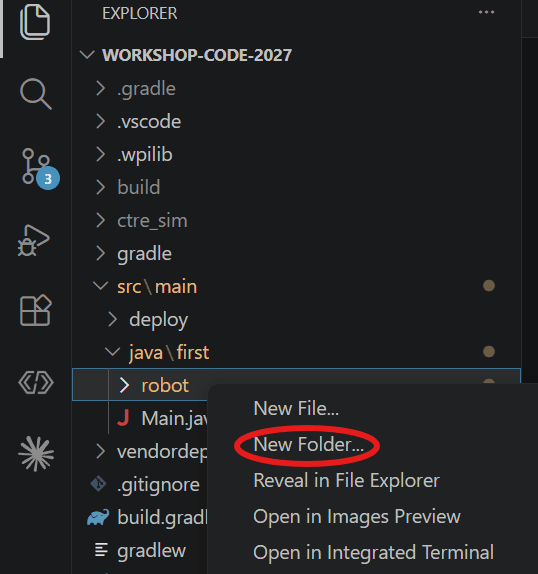
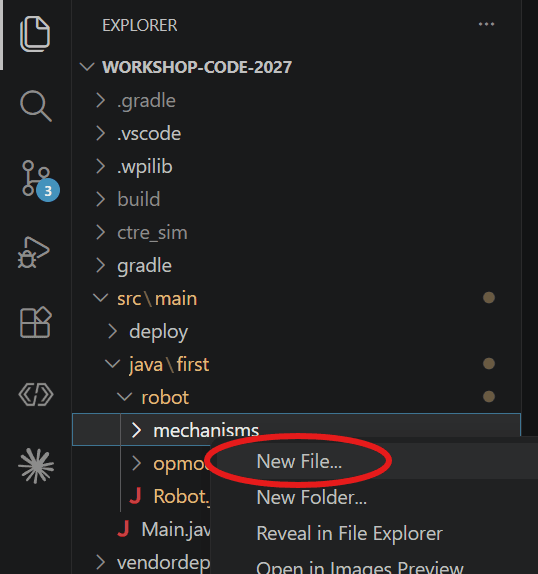
The hardware fields
Name the file Arm.javaFlywheel.java and paste this into it. The package line and the imports are the part you cannot work out from a lesson, so they are here in full. The class is empty and it compiles. The three comments mark the three places the rest of this lesson goes.
package first.robot.mechanisms; // The static imports are the ones your editor will not offer to add for you.// Tuner X writes Volts.per(RotationsPerSecond) into the config you paste below,// so they are here already and that paste just works.import static org.wpilib.units.Units.RotationsPerSecond;import static org.wpilib.units.Units.RotationsPerSecondPerSecond;import static org.wpilib.units.Units.Volts; import com.ctre.phoenix6.CANBus;import com.ctre.phoenix6.configs.FeedbackConfigs;import com.ctre.phoenix6.configs.MotionMagicConfigs;import com.ctre.phoenix6.configs.MotorOutputConfigs;import com.ctre.phoenix6.configs.Slot0Configs;import com.ctre.phoenix6.configs.TalonFXConfiguration;import com.ctre.phoenix6.controls.MotionMagicVoltage;import com.ctre.phoenix6.controls.VoltageOut;import com.ctre.phoenix6.hardware.CANcoder;import com.ctre.phoenix6.hardware.TalonFX;import com.ctre.phoenix6.signals.FeedbackSensorSourceValue;import com.ctre.phoenix6.signals.GravityTypeValue;import com.ctre.phoenix6.signals.InvertedValue;import com.ctre.phoenix6.signals.NeutralModeValue;import org.wpilib.command3.Mechanism; public class Arm implements Mechanism { // The fields go here. public Arm() { // The motor configuration goes here. } // The two methods go here.}package first.robot.mechanisms; // The static imports are the ones your editor will not offer to add for you.// Tuner X writes Volts.per(RotationsPerSecond) into the config you paste below,// so they are here already and that paste just works.import static org.wpilib.units.Units.RotationsPerSecond;import static org.wpilib.units.Units.RotationsPerSecondPerSecond;import static org.wpilib.units.Units.Volts; import com.ctre.phoenix6.CANBus;import com.ctre.phoenix6.configs.MotionMagicConfigs;import com.ctre.phoenix6.configs.MotorOutputConfigs;import com.ctre.phoenix6.configs.Slot0Configs;import com.ctre.phoenix6.configs.TalonFXConfiguration;import com.ctre.phoenix6.controls.MotionMagicVelocityVoltage;import com.ctre.phoenix6.controls.VoltageOut;import com.ctre.phoenix6.hardware.TalonFX;import com.ctre.phoenix6.signals.InvertedValue;import com.ctre.phoenix6.signals.NeutralModeValue;import org.wpilib.command3.Mechanism; public class Flywheel implements Mechanism { // The fields go here. public Flywheel() { // The motor configuration goes here. } // The two methods go here.}Your editor greys out an import until something uses it. That is expected. Most go quiet as you fill the class in, and a few wait for Motion Magic in Code. The class compiles at every step from here. The fields come first.
public class Arm implements Mechanism { private final CANBus canivore = new CANBus("canivore"); private final TalonFX motor = new TalonFX(31, canivore); private final CANcoder encoder = new CANcoder(32, canivore); // Pushes a set voltage at the motor. No sensors involved. private final VoltageOut voltageOut = new VoltageOut(0);public class Flywheel implements Mechanism { private final CANBus canivore = new CANBus("canivore"); private final TalonFX motor = new TalonFX(21, canivore); // Pushes a set voltage at the motor. No sensors involved. private final VoltageOut voltageOut = new VoltageOut(0);implements Mechanismmakes this a mechanism. Every method on that interface already has a body, so there is nothing to override, andrunRepeatedly(...)is yours from here on.new CANBus("canivore")names the bus these devices sit on. That string has to match the name you gave the CANivore in Tuner X. Spell it differently and nothing answers.- The CAN IDs come from Motor Setup: 31 and 3221. If your bench came out with different numbers, change the code to match. Do not leave the two disagreeing.
- One wheel, one motor, and no CANcoder. A flywheel is tuned for speed, and the encoder inside the TalonFX already measures speed. The arm needs a second device because an angle has to be right the moment the robot boots.
VoltageOutis a control request, built once as a field and reused. Configs and requests below says what that means.
Configure the motor once
The constructor runs one time, the moment new ArmFlywheel() is evaluated. NeutralMode is the one setting here you choose. Inverted is not a choice: it is the direction you proved on Motor Setup, and the mechanism decided it long before any code ran. Ignore the two Expo values. They are defaults built into every config Tuner X generates, and no workshop uses them.
These are our numbers, not yours
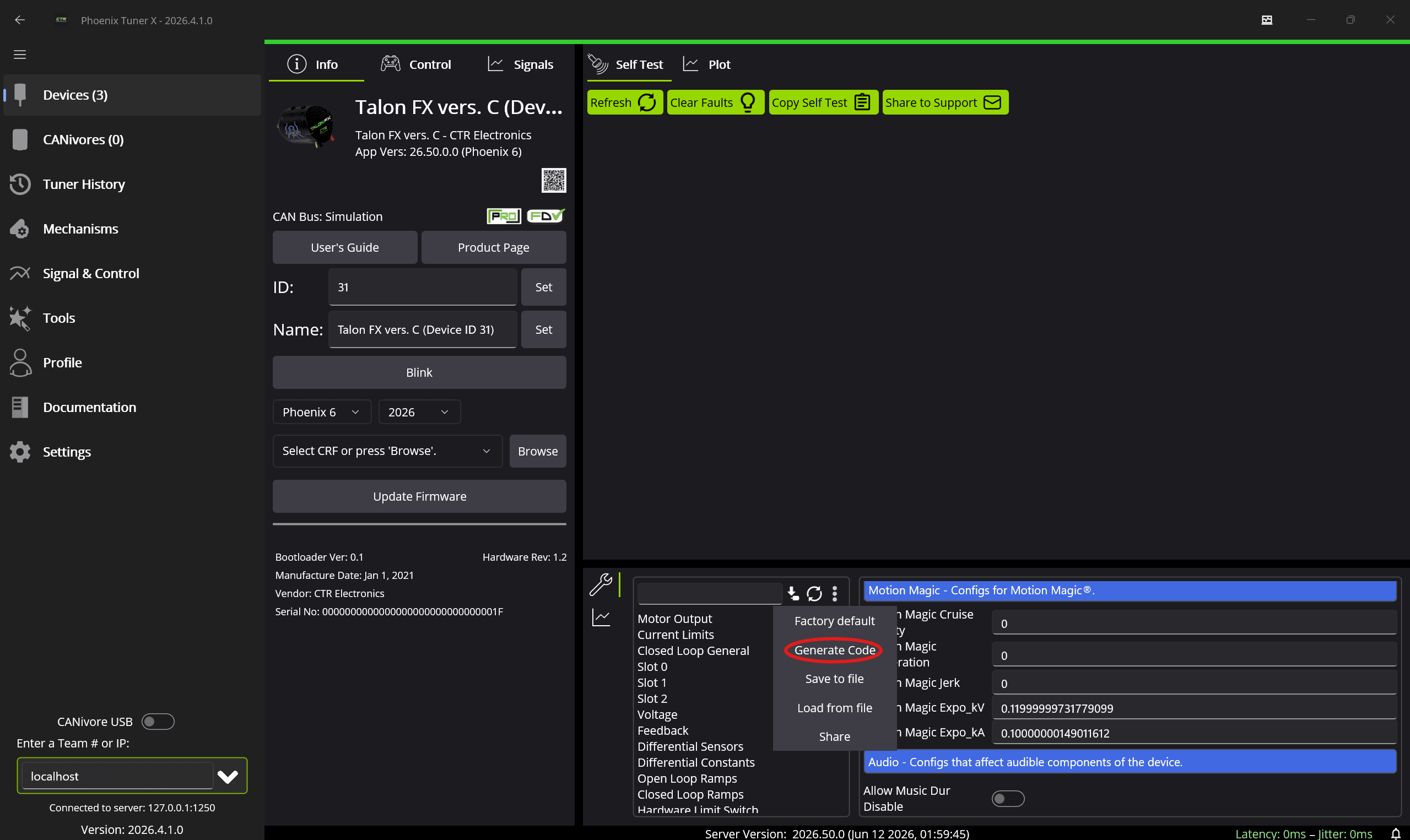
The block below is the shape, not a config to copy. Open the config panel in Tuner X, press the three dots, choose Generate Code, and paste the result over the whole statement. If the device holds your gains from Workshop 1, they come along. Leave them in. Nothing reads them until Motion Magic in Code.
public Arm() { final TalonFXConfiguration talonFXCfg = new TalonFXConfiguration() .withMotorOutput( new MotorOutputConfigs() .withNeutralMode(NeutralModeValue.Coast) // easy to move by hand .withInverted(InvertedValue.CounterClockwise_Positive)) .withMotionMagic( new MotionMagicConfigs() .withMotionMagicExpo_kV( Volts.per(RotationsPerSecond).ofNative(0.119999997317791)) .withMotionMagicExpo_kA( Volts.per(RotationsPerSecondPerSecond).ofNative(0.10000000149011612))) .withFeedback( new FeedbackConfigs() .withFeedbackRemoteSensorID(32) .withFeedbackSensorSource(FeedbackSensorSourceValue.RemoteCANcoder)); motor.getConfigurator().apply(talonFXCfg); } public Flywheel() { final TalonFXConfiguration talonFXCfg = new TalonFXConfiguration() .withMotorOutput( new MotorOutputConfigs() .withNeutralMode(NeutralModeValue.Coast) // easy to spin by hand // positive shoots: clockwise from the motor side .withInverted(InvertedValue.Clockwise_Positive)) .withMotionMagic( new MotionMagicConfigs() .withMotionMagicExpo_kV( Volts.per(RotationsPerSecond).ofNative(0.119999997317791)) .withMotionMagicExpo_kA( Volts.per(RotationsPerSecondPerSecond).ofNative(0.10000000149011612))); motor.getConfigurator().apply(talonFXCfg); }Coast, not Brake
Neutral mode is what the motor does when nothing is commanding it. Coast lets the shaft spin freely, and Brake resists being turned. The lesson armflywheel picks Coast because you will move the arm by handspin the wheel by hand all day. A competition arm carrying weight usually wants Brake, or it drops the instant you disable. A competition flywheel usually keeps Coast. A wheel with that much stored energy braked to a stop punishes the gearbox every cycle.
The CANcoder in the loop
A TalonFX counts its own rotor turns from zero at every power-on. The CANcoder is absolute, and withFeedback makes it the motor's position source. Nothing reads a position on this branch. Leave the block out and every angle you ask for later is measured from wherever the arm sat at power-on.
Nothing to point the motor at
The arm's config has a withFeedback block naming its CANcoder. The flywheel has no CANcoder, so it has no such block. A rotor count starts at zero every power-on, which ruins an angle and does not matter to a speed.
motormotor.getConfigurator().apply(talonFXCfg) sends every setting above to the motor controller in one message.
Two methods
/** * Push the arm with a fixed voltage. Positive voltage moves the arm counter-clockwise. * * @param voltage The voltage to apply. */ private void setVoltage(double voltage) { motor.setControl(voltageOut.withOutput(voltage)); } /** Stop the motor. */ private void stopMotor() { motor.stopMotor(); }} /** * Spin the flywheel with a fixed voltage. * * @param voltage The voltage to apply. */ private void setVoltage(double voltage) { motor.setControl(voltageOut.withOutput(voltage)); } /** Stop the motor. */ private void stopMotor() { motor.stopMotor(); }}voltageOut.withOutput(voltage) sets the number on the request object you built as a field, and motormotor.setControl(...) sends it.
Nothing here reads a sensor. Ask for 6 V and you get 6 V, whatever the armflywheel does with it.
Both are private, and nothing calls them yet. The next lesson wraps them in commands, and one of those commands takes the name stop, so the helper is stopMotor.
Configs and requests
This file sends the motor two kinds of message. A config is settings: inversion, neutral mode, gains, the feedback sensor. The TalonFX saves it, so the constructor applies it once. A is what to do right now, and it carries the target. The target changes while the robot runs, so code sends a request every loop.
You have used both in Tuner X. The config panel is the config, and the Control drop-down on Motor Setup picks a request. Voltage Out in that drop-down is VoltageOut here. Motion Magic Voltage is MotionMagicVoltage, which replaces it two lessons from now.
Every request name is made of the same parts. The column is what the motor outputs. The row is what it aims at, and a MotionMagic prefix means a profile shapes the move.
| Aims at | Duty cycle | Volts | Amps |
|---|---|---|---|
| Nothing | DutyCycleOut | VoltageOut | TorqueCurrentFOC |
| A position | PositionDutyCycle | PositionVoltage | PositionTorqueCurrentFOC |
| A velocity | VelocityDutyCycle | VelocityVoltage | VelocityTorqueCurrentFOC |
| A position, profiled | MotionMagicDutyCycle | MotionMagicVoltage | MotionMagicTorqueCurrentFOC |
| A velocity, profiled | MotionMagicVelocityDutyCycle | MotionMagicVelocityVoltage | MotionMagicVelocityTorqueCurrentFOC |
This course stays in the volts column, so the gains you tuned are in volts. A request also stays latched. The motor keeps applying the last one it received until a different one arrives, even after the code that sent it has stopped running. That is what stopMotor() is for, and Hardware Simulation shows what happens without it.
Hand it to Robot
Nothing has built the class yet. Robot is where it becomes a real object: built once at startup, outliving every mode, and handed to every OpMode. Add the two fields.
package first.robot; import first.robot.mechanisms.Arm;import first.robot.mechanisms.Flywheel;import org.wpilib.command3.Scheduler;import org.wpilib.framework.OpModeRobot; public class Robot extends OpModeRobot { // The robot's mechanisms. Public so OpModes can use them. public final Arm arm = new Arm(); public final Flywheel flywheel = new Flywheel(); public Robot() {} @Override public void robotPeriodic() { Scheduler.getDefault().run(); }}public so every OpMode can reach them, and final so nothing swaps them out.
Building only the armflywheel? Delete the FlywheelArm field and its import. A field that builds a class you never wrote does not compile.
Check your work
Nothing on this branch moves a motor, so the check is a build.
- Run WPILib: Build Robot Code. You should see
BUILD SUCCESSFUL, which means every import resolved and every name you typed exists. - List
src/main/java/first/robot/mechanisms/.Arm.javaFlywheel.javais in it, besideRobot.java. - In Tuner X, confirm every device answers on the
canivorebus at 31 and 3221. Those have to be the numbers in your constructor.
You should see
- Private final fields on
ArmFlywheel, and a constructor ending ingetConfigurator().apply(talonFXCfg). setVoltageandstopMotor, bothprivate, and no public method but the constructor.
Check yourself
Which statement about Mechanism is correct?
The constructor sets withNeutralMode(NeutralModeValue.Coast). What does that mean, and why this mechanism?
Why does Arm's config name a feedback sensor when nothing on this branch reads a position?
setVoltage sends voltageOut.withOutput(6.0) once, and then nothing calls it again. What does the motor do?